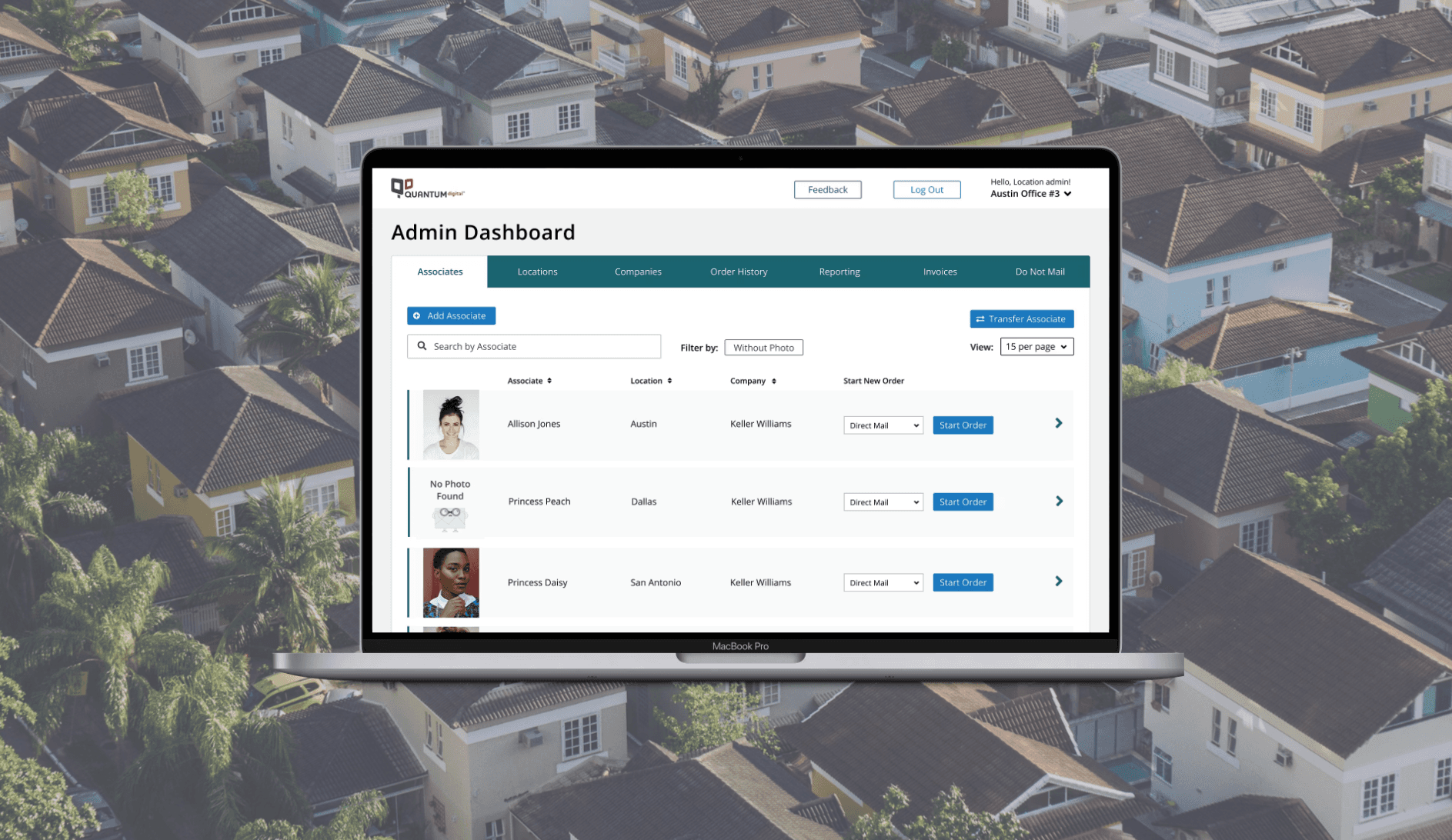
Simplified this complex targeted demographic tool to empower users to achieve their objectives
B2C
Redesign
UX Design

Client
QuantumDigital
Project Duration
5 Months
Role
Designer
Overview
Targeted Demographics is a core component of QuantumDigital’s marketing platform. While it allows precise audience targeting, the tool has become increasingly complex and difficult to use. Users must navigate multiple selections, filters, and validation steps, which makes campaign creation labor-intensive and error-prone.
Improving usability has the potential to reduce support requests, accelerate campaign setup, and improve user satisfaction — all of which support retention and adoption among marketing professionals.
The Problem
Outdated Design
The tool has not been updated in decades and does not follow the current design system, resulting in inconsistencies with QuantumDigital’s brand. The interface feels cluttered and unintuitive, making it harder for users to navigate and trust the platform.
Usability Concerns
Users struggle to complete tasks efficiently and often require assistance from Customer Support. The process of selecting demographics, applying filters, and validating selections is confusing, labor-intensive, and error-prone, which increases cognitive load and slows down campaign creation.
High Bounce Rate
Frustration with the tool contributes to users leaving the site prematurely. Many abandon the campaign setup process before completion, which reduces engagement, lowers adoption, and limits the potential impact of marketing campaigns.
Research
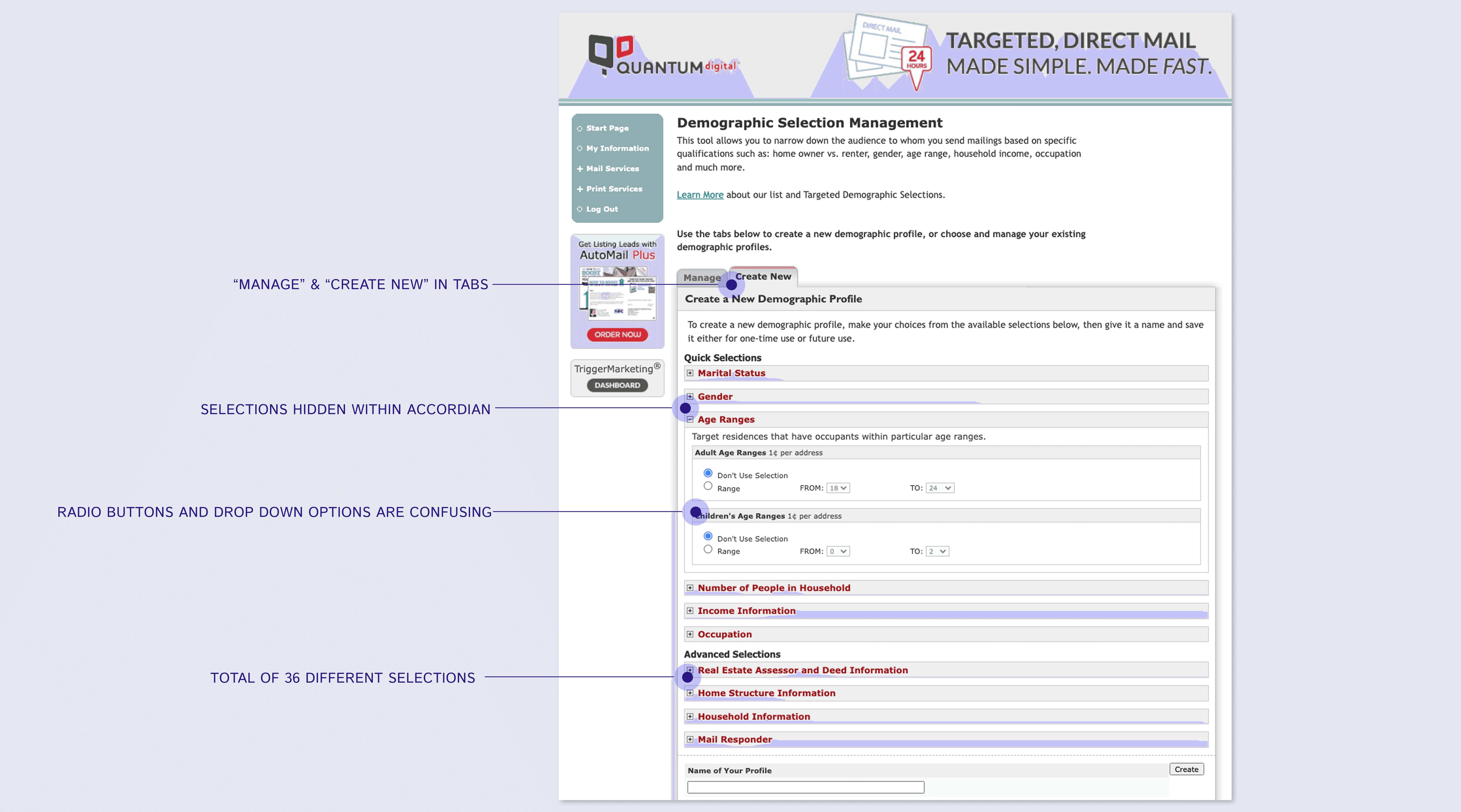
To inform the redesign of Targeted Demographics, we conducted a mix of quantitative and qualitative research to understand user needs and behavior. With user surveys, we asked users to rank demographic options from most to least useful. This helped prioritize which fields to keep, remove, or simplify, reducing cognitive load and minimizing unnecessary complexity.
Our Customer Support team provided direct feedback from users who had contacted them for help. These conversations highlighted common frustrations, usability issues, and points where users abandoned tasks. We also collected usage metrics and analyzed bounce rates to identify where users struggled most and where workflows caused drop-offs.
Key Findings
Difficulty creating new profiles
Users found the profile creation process confusing and time-consuming.
Inefficient management of existing profiles
Users struggled to locate, edit, or duplicate demographic profiles once created.
Feature overload
The sheer number of demographic options contributed to errors and frustration, especially for new or occasional users.
Research
Design Opportunities
Based on research insights, we identified several opportunities to improve the usability and effectiveness of the Targeted Demographics tool. These opportunities guided the redesign and helped prioritize the MVP scope.
Simplify Profile Creation
Streamline the creation flow, present only the most relevant fields, and provide clear guidance to reduce cognitive load.
Improve Profile Management
Introduce a clear, centralized interface for managing demographic profiles, making it easy for users to review and modify them.
Reduce Feature Overload
Prioritize and surface high-value, revenue-generating options while hiding or de-emphasizing less-used fields.
Restructuring the List Management Experience
The existing Targeted Demographics interface suffered from a confusing hierarchy, making list management tools difficult for users to find and use. Inconsistent placement and unclear navigation caused frustration and slowed workflows.
A major goal of the redesign was to update the information architecture for both Targeted Demographics and the broader List Management platform. The aim was to create a consistent, user-friendly structure that allowed users to access all list tools quickly and efficiently.
Centralized Navigation
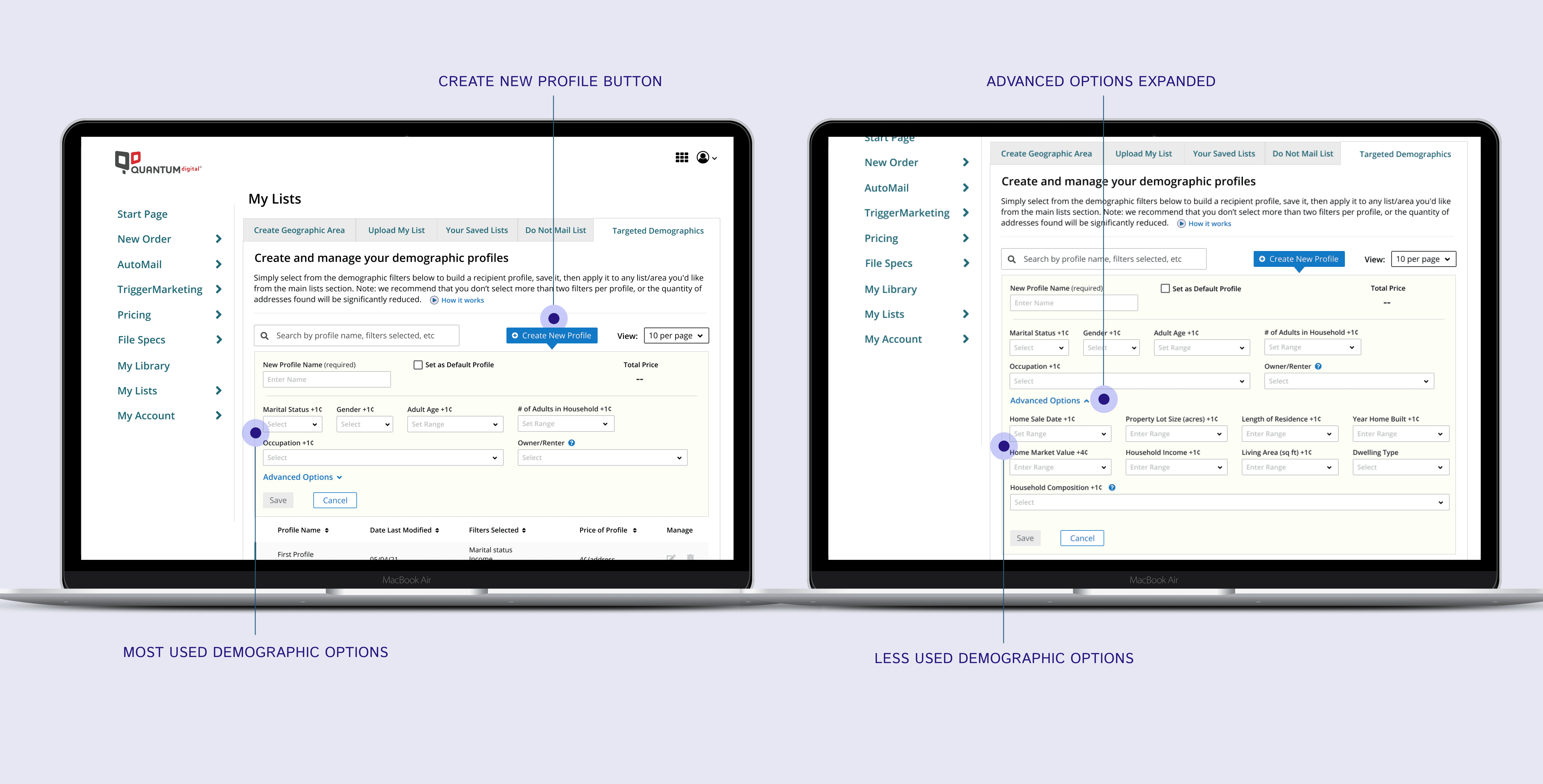
We reorganized the List Management section by grouping all list tools together, including Targeted Demographics, under a single tabbed interface. This allowed users to navigate between tools without leaving the page, reducing clicks and cognitive load.
Consistent Structure
Tabs and hierarchy were standardized across the platform to reflect user workflows rather than legacy feature groupings. This alignment improved discoverability, minimized confusion, and created a more cohesive experience across the List Management platform.
Outcome
Through user testing, we were able to find that the updated IA made it easier for users to find and use the tools they needed, laying the foundation for a simplified, efficient, and user-focused redesign of Targeted Demographics.
Approach
Prioritizing Key User Functions
To support users’ primary tasks, we redesigned the Demographic Profiles experience around efficient management and quick profile creation.
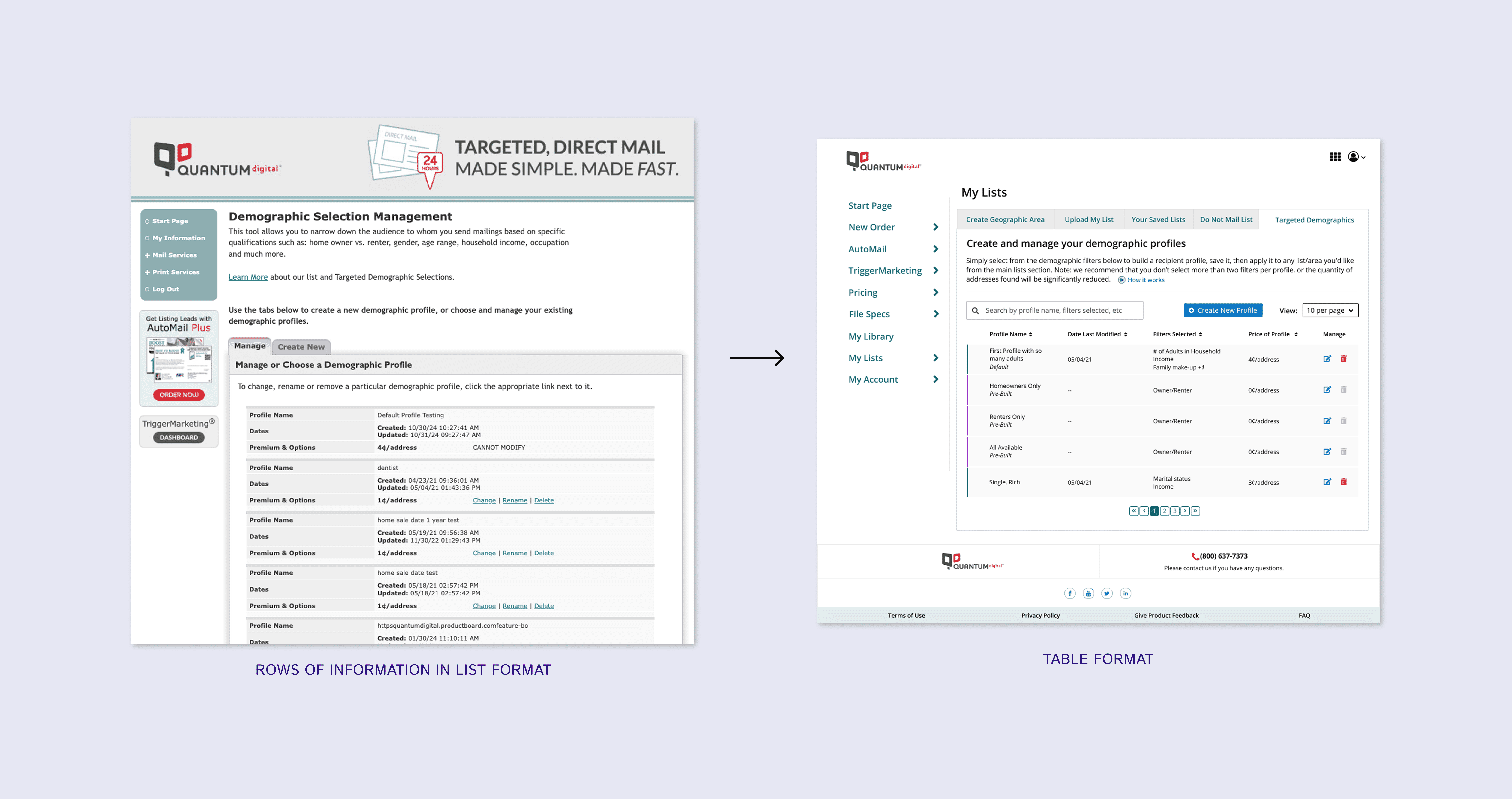
Table-Based Profile View
Profiles were reorganized into a structured table layout, allowing users to quickly scan, compare, and sort key information. The table view also enabled users to see a larger number of profiles at once, improving efficiency and reducing time spent navigating between pages.
Search and Sorting
We introduced a search function and sortable columns so users could easily locate specific profiles without manually browsing through lists. This reduced effort for users managing multiple campaigns or frequently reused profiles.
Unified Workflow
Previously, creating profiles and managing existing ones existed in separate areas of the tool. We combined these workflows into a single screen and added a prominent “Create New Profile” action. Users can now create, view, and manage demographic profiles from one place, eliminating unnecessary navigation and simplifying the overall experience.
This redesign aligned the interface with real user behavior, enabling faster task completion and a more intuitive workflow.
Increasing Usability
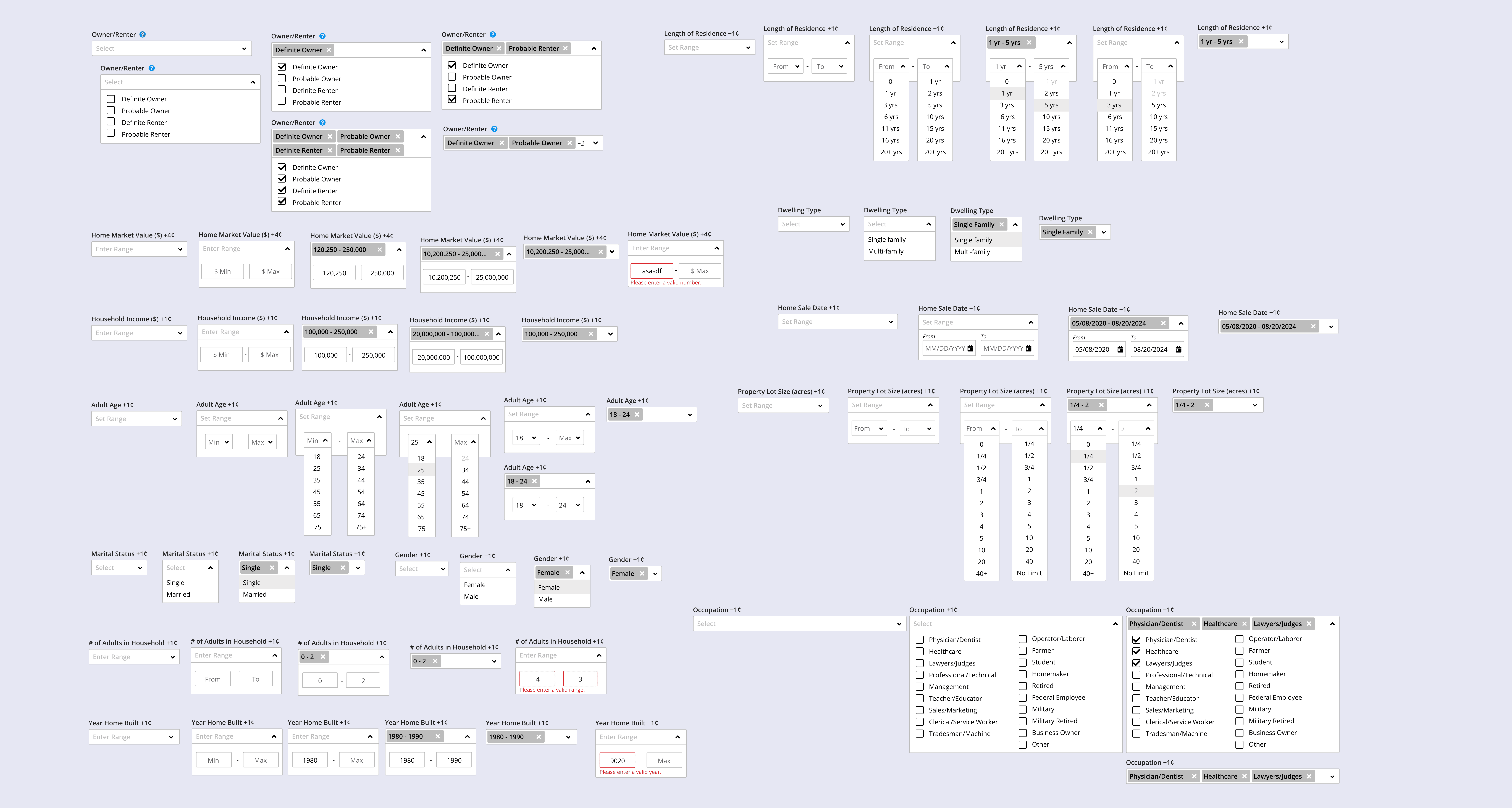
One of the most common frustrations users reported was navigating the demographic fields and understanding how to make selections. The existing inputs were unclear and unintuitive, which led to frequent mistakes and uncertainty during profile creation.
To address this, we redesigned each demographic input and validated the designs through usability testing. The goal was to match each field with the most appropriate input type so users could easily understand how to enter information correctly.
Appropriate Input Types
• Checkboxes were used when multiple selections were allowed
• Dropdown selects were used when only one option could be chosen
• Text or range fields were used for numerical inputs
This alignment reduced ambiguity and helped guide users toward correct entries without requiring external assistance.
Inline Validation and Feedback
We also introduced inline validation to immediately surface errors and missing information. Instead of discovering issues at the end of the workflow, users could correct them in context, improving efficiency and confidence.
By clarifying how users interact with each demographic field and providing immediate feedback, the profile creation process became easier to understand, faster to complete, and less prone to mistakes.
Approach
Simplifying the Complex
The original tool presented users with a large number of demographic options at once, which contributed to confusion and slow decision-making. According to Hick’s Law, the more choices users are given, the longer it takes them to decide. This led to frustration and increased abandonment during profile creation.
To reduce cognitive load, we reduced the number of visible options from 36 to 15 by prioritizing the most valuable and commonly used demographics. We grouped related options into clear categories and introduced a staged workflow so users were guided through selections step by step rather than all at once.
By progressively presenting information, users could focus on one decision at a time instead of processing every option simultaneously. This prevented users from feeling overwhelmed and made the selection process more approachable and efficient.
This structured approach simplified decision-making, improved clarity, and helped users complete profile creation with greater confidence.
Approach
Improving Learnability and Visibility
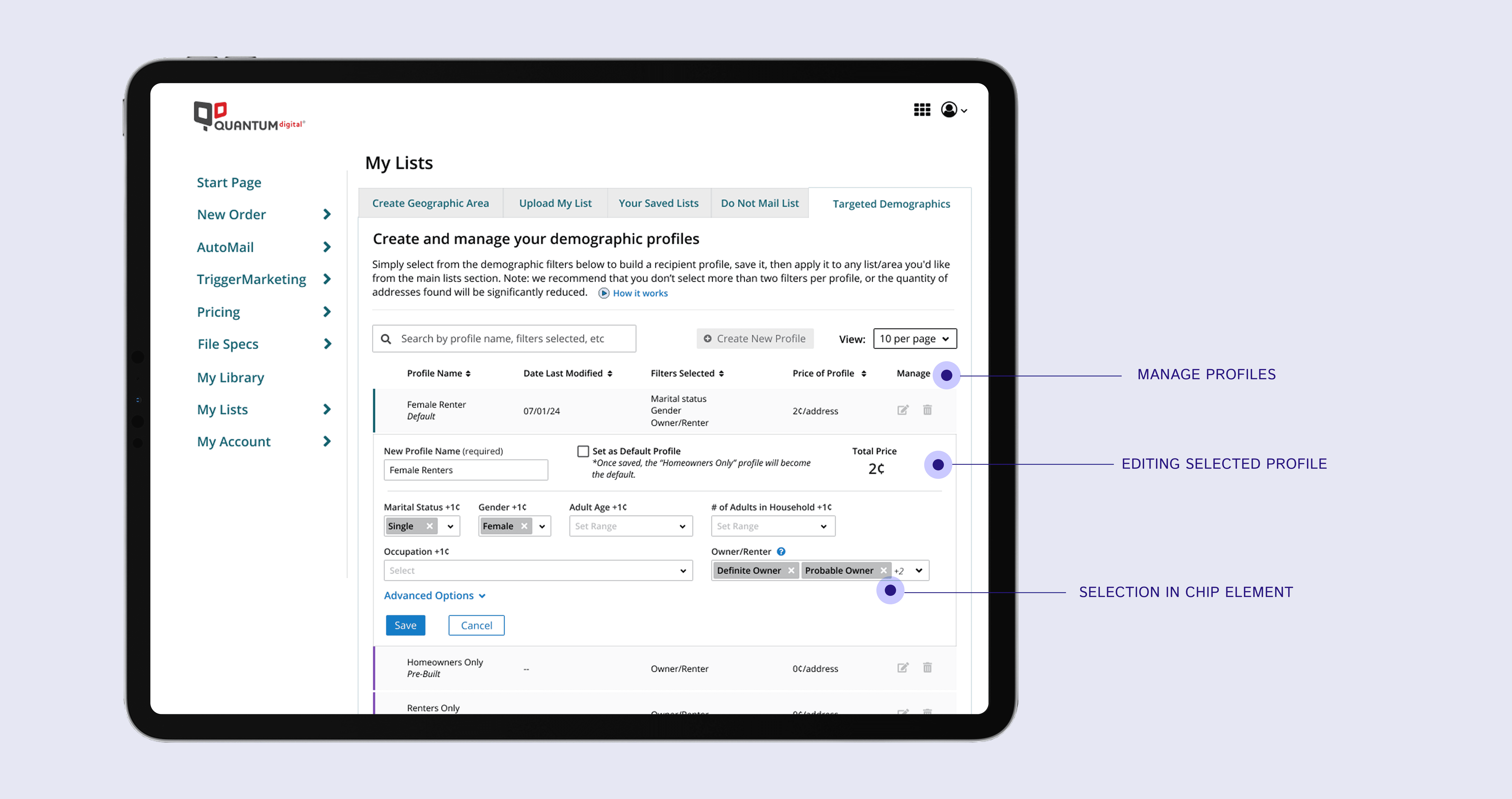
To improve usability and reduce confusion, the Edit Profile experience was designed to mirror the Create Profile workflow. Maintaining the same structure, layout, and interactions allowed users to quickly understand how to navigate the tool and know what to expect when returning to modify an existing profile. By keeping the creation and editing flows aligned, users did not need to relearn the interface for a different task. This consistency increased learnability and made profile management more intuitive.
We also improved how selections were displayed. Previously, chosen options were hidden inside dropdown menus, making it difficult for users to confirm their selections. The redesign introduced selection chips displayed directly within each field. Users could now easily scan and verify their choices at a glance.
Making selections visible and consistent reduced uncertainty, improved scannability, and helped users feel more confident before completing their profile.
Results + Takeaway
Improved usability
By simplifying workflows, clarifying inputs, and restructuring navigation, users were able to create and manage demographic profiles more easily and with fewer mistakes.
Reduced user frustration
Clearer fields, visible selections, and staged decision-making lowered cognitive load and increased user confidence when setting up campaigns.
Lower support dependency
Customer Support reported fewer requests related to profile setup and demographic selection, indicating users could successfully complete tasks independently.
Increased engagement
The streamlined experience reduced premature drop-offs and encouraged users to complete the targeting process rather than abandoning it.
The improved design contributed to a 9% increase in the conversion rate and a 4.5% increase in revenue.
By highlighting high-value demographic options while simplifying the workflow, we improved usability and increased revenue. This project reinforced that user-centered design and business outcomes are not competing priorities — they strengthen each other when designed intentionally.