Created a platform to give our largest users a quicker and cleaner ordering process and agent-management experience.
0 to 1
B2B
UX Design
Client
QuantumDigital
Project Duration
6 Months
Role
Designer
Overview
Approximately 40% of company orders were placed by enterprise customers in the real estate industry. Despite their volume and importance, these customers were using a platform designed primarily for individual users.
Brokerage administrators were responsible for managing large teams of agents and placing orders on their behalf, but the existing experience did not support administrative workflows. As a result, enterprise customers relied heavily on manual processes and customer support to complete routine tasks.
The Problem
Inefficient ordering workflow. Administrators frequently placed orders on behalf of multiple agents. To do this, they had to log out and back in repeatedly, accessing each agent’s account individually from the start page. Completing routine daily work required navigating the full ordering flow multiple times, creating unnecessary effort and increasing the chance of errors.
No reporting capabilities. Administrators were responsible for monitoring team activity and communicating progress to leadership. However, the platform did not provide reporting tools. To track orders, they manually compiled spreadsheets and cross-referenced order confirmations, which was time-consuming and difficult to maintain.
Lack of an enterprise experience. The system treated every user as an individual customer. Enterprise users needed organization-level oversight, including managing agents and viewing activity across the brokerage. Without these capabilities, administrators relied on external coordination and customer support to perform basic management tasks.
Research
To better understand enterprise customers, we conducted user surveys and moderated interviews with brokerage administrators. The goal was to learn how they currently managed agents and orders, and where the platform created friction in their daily work.
In parallel, we met with internal stakeholders, including customer support and sales teams, to understand business priorities and common customer requests. Support teams provided valuable insight because they regularly assisted administrators with tasks the system did not support.
The research helped distinguish between perceived feature requests and underlying workflow problems, allowing the team to prioritize the initial MVP scope around the most impactful needs.
Key Findings
Administrators worked at the team level, not the individual level
Admins needed visibility across all agents and orders in one place. Switching between individual accounts disrupted their workflow and consumed significant time.
Ordering was a delegated task
Many agents relied on administrators to place orders for them. The ordering process therefore needed to support acting on behalf of others rather than requiring separate logins.
Reporting was essential for oversight
Admins were accountable for tracking activity and communicating status to brokerage leadership. Because reporting did not exist in the platform, they maintained manual spreadsheets to monitor progress.
Support filled product gaps
Administrators frequently contacted support to retrieve order information or perform actions they could not complete themselves. This indicated the platform lacked necessary administrative controls.
Research
Design Opportunities
Research showed the problem was not simply missing features — it was a mismatch between a single-user product model and an organization-based workflow. Based on key findings, we defined several design opportunities to guide the platform direction and MVP scope.
Support organization-based workflows
Instead of treating each customer as an individual account, the system needed to recognize a brokerage as an organization. Administrators required the ability to view and manage multiple agents from one centralized location.
Enable ordering on behalf of others
Administrators frequently placed orders for agents. The experience should allow admins to initiate and track orders without switching accounts or repeating the full workflow for each user.
Provide operational visibility
Admins needed oversight of team activity. The platform should surface order status, history, and progress across all agents so administrators could monitor work without external tracking.
Introduce reporting capabilities
Manual spreadsheets indicated a missing system function. The platform should allow users to generate customizable reports that support brokerage management and leadership communication.
Reduce reliance on support
Many administrative tasks required contacting customer support. Enabling self-service management — including agent management and order tracking — would improve efficiency for users and reduce operational overhead for the business.
Information Architecture
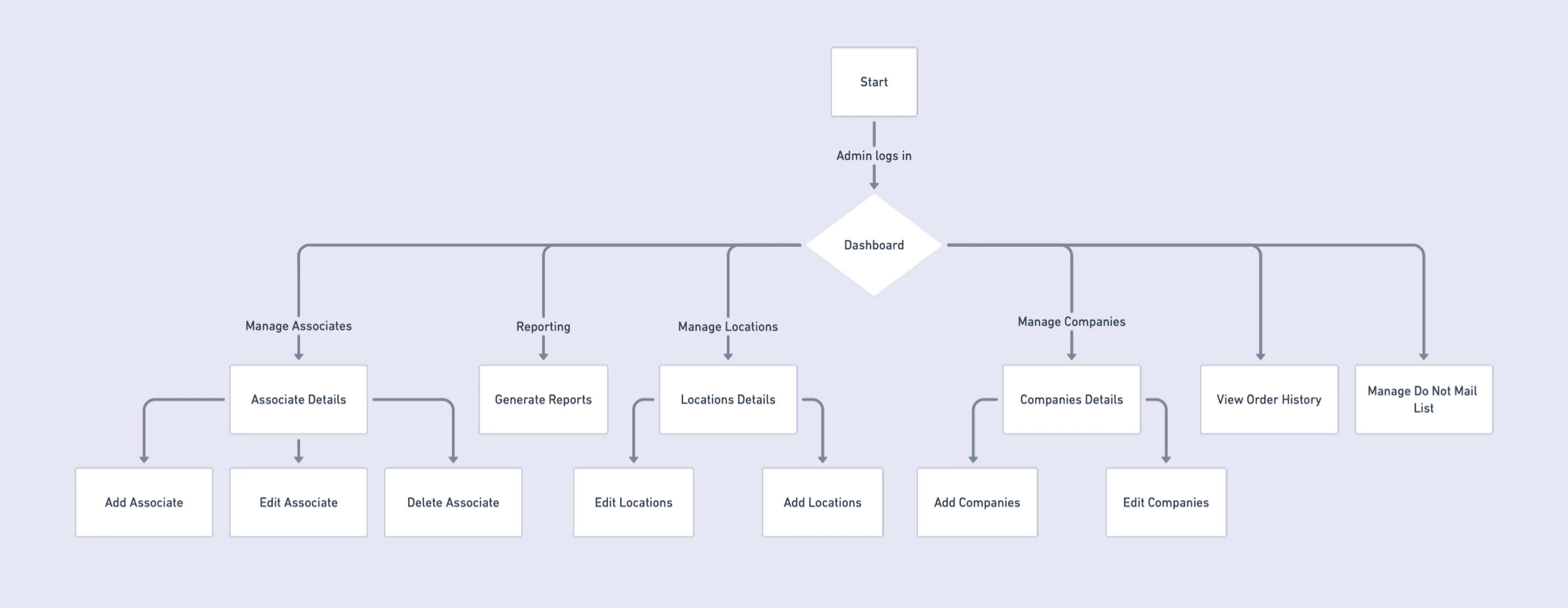
Research showed the core issue was structural: administrators needed oversight across multiple agents, but the navigation forced them into single-user workflows.
To address this, we mapped the navigational flow and platform structure before designing screens. The goal was to ensure the system architecture reflected how brokerages actually worked rather than how the existing product was built. The new structure introduced an organization-based hierarchy. Instead of entering the product as an individual account, administrators accessed a centralized workspace where they could manage agents, orders, and reporting from one location.
Approach
Designing Reporting for Non-Technical Users
Reporting was one of the most frequently requested capabilities from enterprise administrators. Brokerage managers needed visibility into team activity and order volume, but most were not technical users and were unfamiliar with complex reporting tools.
The design goal was to enable administrators to generate customized reports without requiring training or support.
Before designing the interface, we defined a framework to guide the reporting experience. For each report type, we evaluated:
• User’s decision-making goal
• Key metrics required
• Filters needed to refine results
• Whether the report directly supported administrative workflows
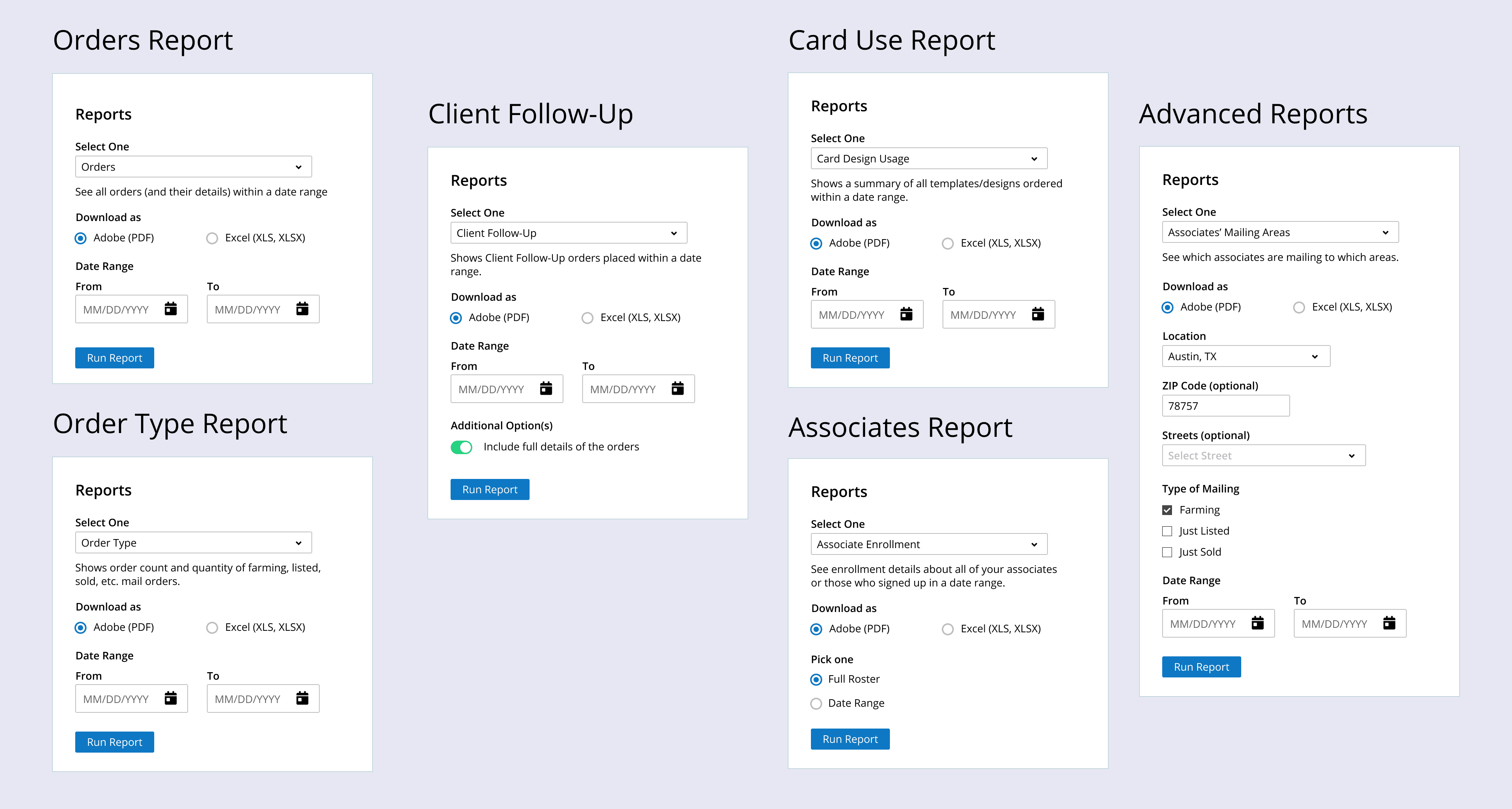
Instead of presenting users with a complex query builder, we designed structured report forms that guided them through selecting parameters. Users could choose a report type and then refine it using clear filters.
Each report focused on answering a specific administrative question (for example: team activity, order progress, or agent performance). By limiting options to relevant filters, the interface reduced cognitive load and prevented misconfigured reports.
Designing with Technical Constraints
As reporting requirements became more defined, we worked closely with the engineering team to ensure the reporting experience was technically feasible.
To support the reporting feature, engineers needed to reorganize and parse data so it could be aggregated and exported based on user-selected filters such as agent, date range, and order status. Because reporting depended on how the database was structured, design decisions directly affected backend implementation.
We reviewed report requirements together, aligning the interface design with what could be reliably generated from the system. This collaboration helped prevent designing interactions that the platform could not support and allowed us to prioritize reports that delivered the most value to administrators.
Approach
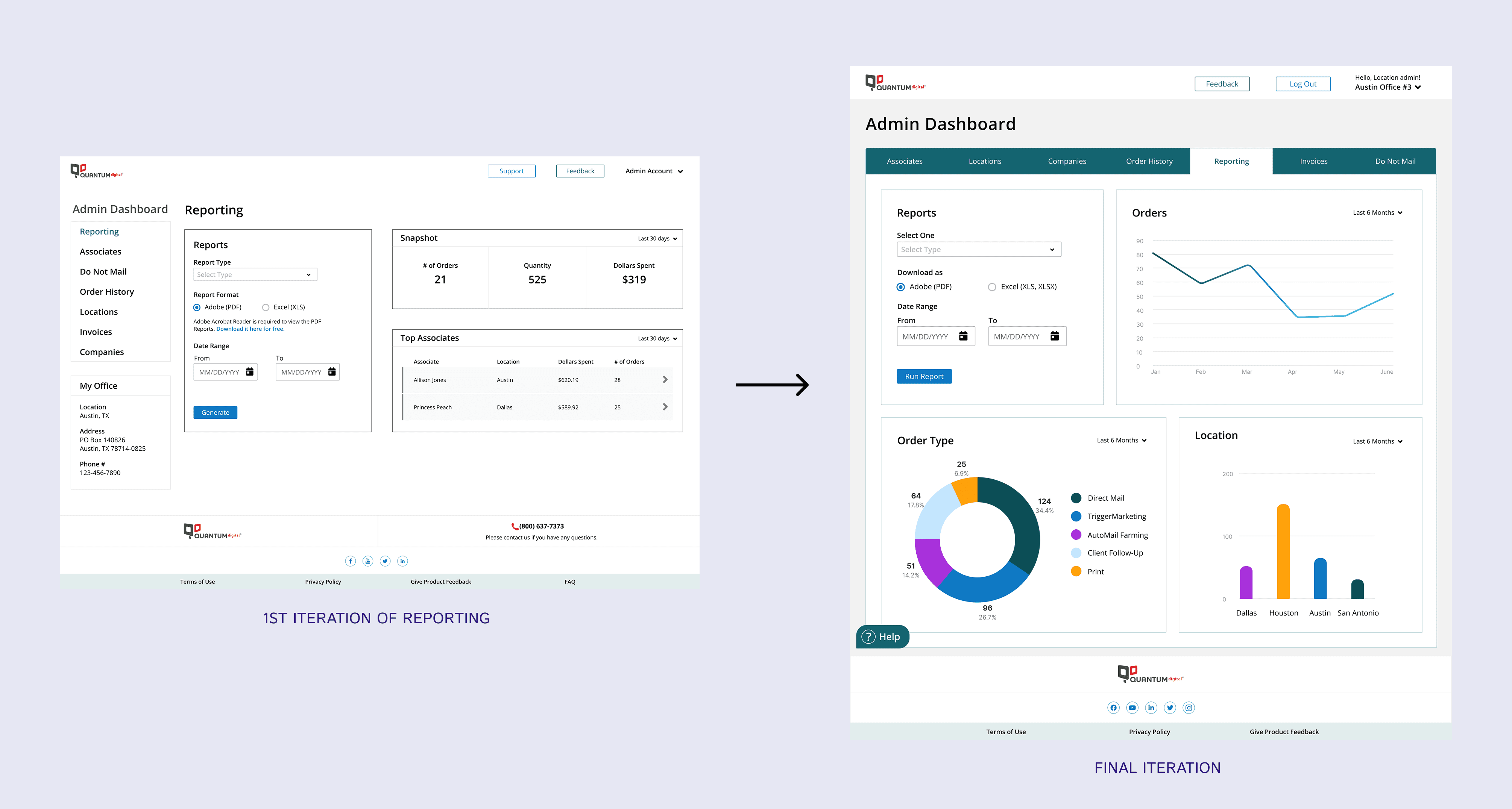
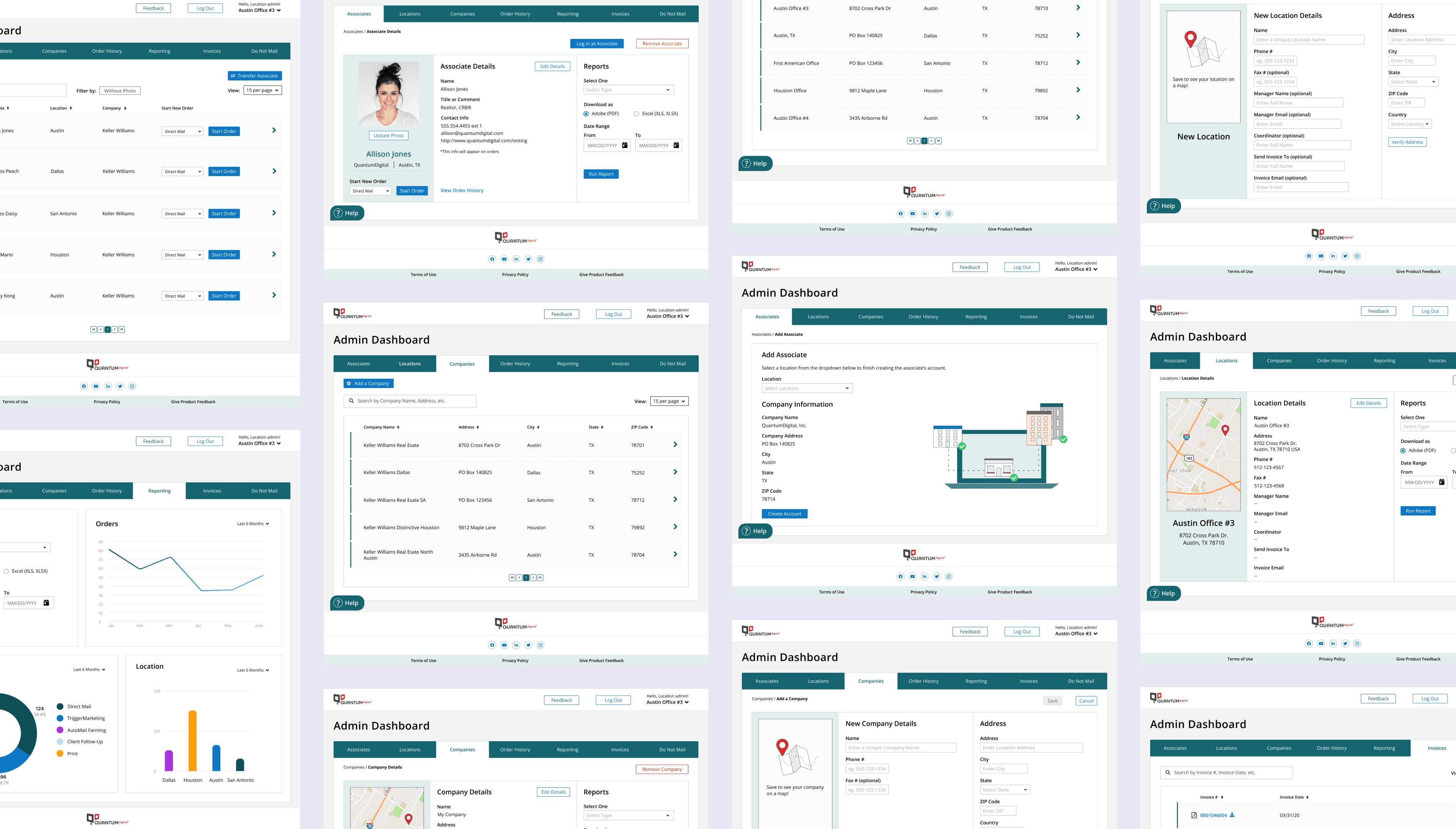
The evolution of the reporting page was a key focus of the design process. Our goal was not only to provide a reporting tool, but also to help users quickly understand how the KPIs they were tracking were performing.
Early iterations featured a numerical snapshot of key metrics and a list of top-performing agents. However, usability testing revealed that users preferred visual representations of data over static numbers, and the top agents list did not provide meaningful value.
Based on this feedback, we redesigned the page to incorporate data visualizations alongside the reporting form. The addition of charts and trend views allowed users to quickly interpret performance and identify patterns without needing to generate a full report.
Approach
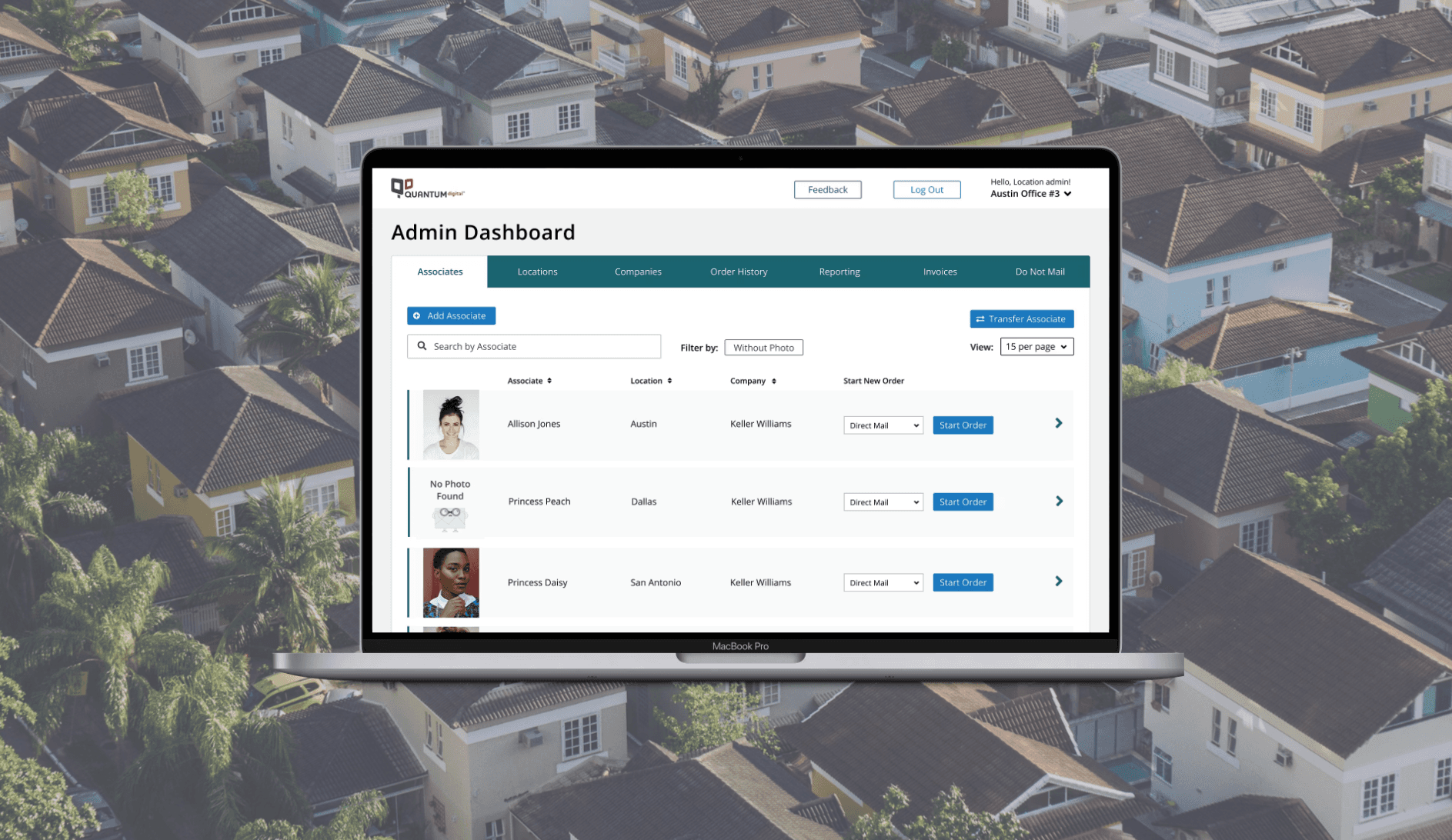
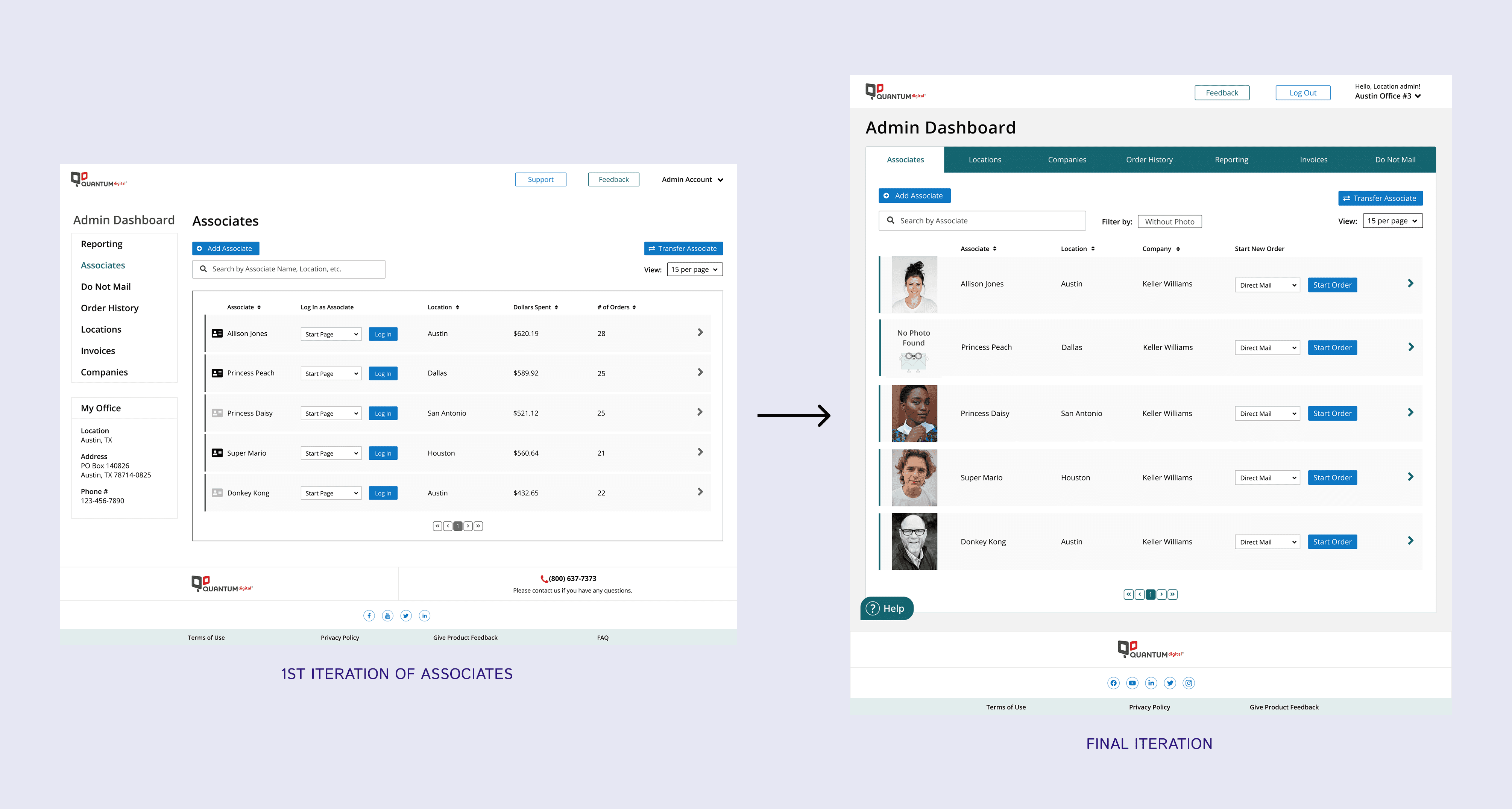
The iteration of the Associates page focused on making it easier for administrators to place orders on behalf of their associates. Early versions required admins to log in as an associate before submitting an order, which added unnecessary steps.
After collecting feedback, it became clear that this workflow could be simplified. In collaboration with the development team, we redesigned the experience so that admins could place orders for associates directly from the dashboard. This streamlined approach reduced friction and delivered a more seamless experience that aligned with user needs.
Results + Takeaway
Customized experience for Enterprise users
Delivered a 0 to 1 platform tailored to the needs of administrators, supporting agent management, reporting, and ordering workflows.
Simplified ordering process
Admins could place orders directly from the dashboard, reducing steps and streamlining interactions for multiple agents.
Enhanced reporting and management
Introduced visual reporting and centralized agent oversight, allowing administrators to monitor performance and make data-driven decisions.
User feedback was overwhelmingly positive. Administrators highlighted the platform’s usefulness and the improved experience, which strengthened engagement and reinforced the overall Enterprise customer experience.
The redesign contributed to a 5.2% increase in conversion rates, reflecting more orders completed efficiently through the platform.
The project demonstrates how user-centered design not only improves operational efficiency but also drives tangible business results.

